
 | ||
 | ||
|

 Google Turns The +1 Button Into Its "Like" Button (Finally) Google Turns The +1 Button Into Its "Like" Button (Finally) Google has announced changes to the +1 button that could mean huge things for sites and businesses in terms of driving traffic. Google has turned the +1 button into what it should have been when Google+ was launched: a means of sharing content to your Google+ Circles. Or in other words, Google's version of the "like" button. Do you expect Google's +1 buttons to have a major impact on traffic? Let us know what you think. Before, the +1 button was basically just a way of telling Google that content was good enough to be considered a good search result. It presumably still serves this function as well. +1s simply showed up in the +1s tab on a user's profile. You know, where none of your friends see them. Now, you can share content with your circles more easily like you're using a social network - which you now are. For publishers, this should be tremendously helpful in boosting traffic from Google+. It means more visibility and more reason for people to share your content on Google+. "Clicking the +1 button is a great way to highlight content for others when they search on Google.," says Google's Vic Gundotra. "But sometimes you want to start a conversation right awayâ€"at least with certain groups of friends. So beginning today, we're making it easy for Google+ users to share webpages with their circles, directly from the +1 button. Just +1 a page as usual and look for the new 'Share on Google+' option. From there you can comment, choose a circle and share." 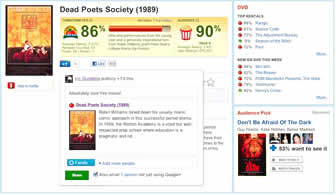  "When you share content from the +1 button, you'll notice that we automatically include a link, an image and a description in the sharebox," he adds. "We call these '+snippets,' and they're a great way to jumpstart conversations with the people you care about." Publishers can customize +snippets. You can alter the markup to fit the kind of content you provide. "You may already be using this markup to build rich annotations for your pages on Google Search," says Group Product Manager Daniel Dulitz. "If not, marking up your pages is simple. Just add the correct schema.org attributes to the data already present on your pages. You'll set a name, image, and description in your code." More on the markup types here. A New inline annotations feature may remind you a bit of some Facebook social plugins. "Now, when a person visits a page that someone they know has +1'd, they can see a name and face reminding them to pay special attention to your content," says Duliz. This looks like this: 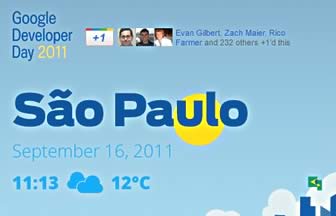 You can add inline annotations by updating your +1 button code from the configuration tool. A report from BrightEdge last month found that adoption of the Google +1 button was already on the rise. The launch of Google+ itself only served to increase this adoption, and this new functionality should increase it even more. Why not use it on your content? It can influence your search rankings for the better and encourage social traffic. Do you see any reasons not to use the Google +1 button? Let us know in the comments.  What are your thoughts? ![[Digg This!]](http://images.ientrymail.com/webpronews/videosite/digg.gif) ![[Facebook]](http://images.ientrymail.com/webpronews/videosite/facebook.png) ![[Twitter]](http://images.ientrymail.com/webpronews/videosite/twitter.png) ![[StumbleUpon]](http://images.ientrymail.com/webpronews/videosite/stumbleupon.png)
|







 | Advertising | Newsletters | Corporate Info | Site Map | Support |
© 2011 WebProNews. An  email newsletter. email newsletter. , Inc. 2549 Richmond Rd. Lexington KY, 40509 , Inc. 2549 Richmond Rd. Lexington KY, 40509 All Rights Reserved. Terms under which this service is provided to you. Read our privacy policy. Contact us. |  The WebProNews network includes WebProWorld, Jayde and Twellow. The WebProNews network includes WebProWorld, Jayde and Twellow. |  |


No comments:
Post a Comment